
Picture a store that shows one popup to every visitor. A shopper who just clicked a spring-sale link and a shopper comparing shipping policies get the same greeting, though they arrived wanting different things. Micro-segmentation fixes that: it splits an audience into groups small enough that each one gets a message fitted to its own situation, based on what is observable in the visit itself, the page, the source, the behavior so far, rather than a customer record. (That last part is the boundary: this is about display segmentation, not CRM or customer-database segmentation, which needs data a popup tool never holds.) Three worked popup scenarios sit in the middle of this guide.
Micro-segmentation vs. macro-segmentation
Macro-segmentation sorts an audience into a few large groups that share one broad trait: shoppers in one country, first-time versus existing buyers, visitors on mobile. Those groups are easy to size and easy to reach, and they hide a lot of difference. Two visitors from the same country on the same phone can want entirely different things. One is comparing sofas after clicking a seasonal email, the other landed by accident on a shipping-policy page. Treating them as one group means the message is written for neither of them.
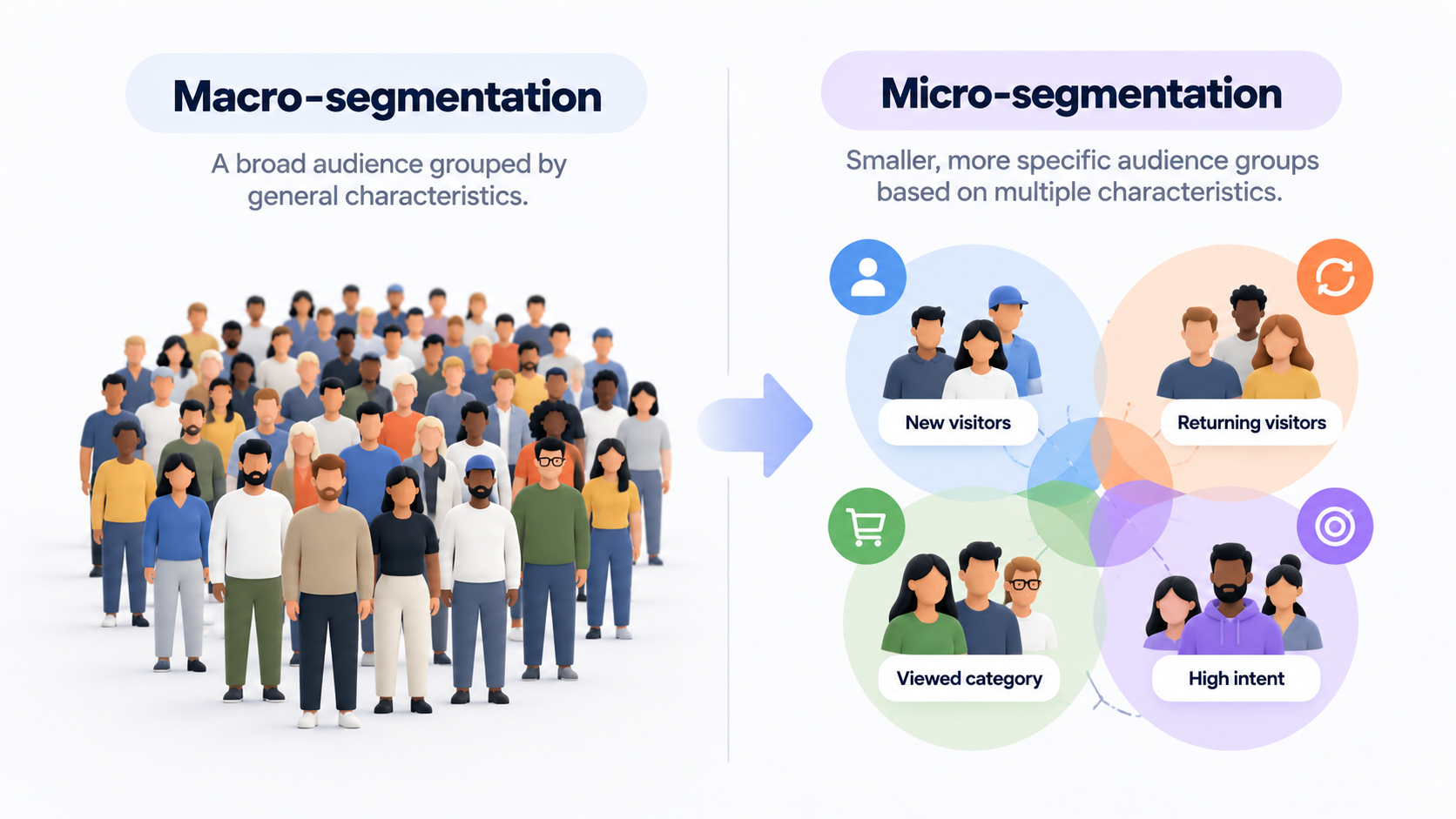
Micro-segmentation just keeps cutting until the group shares a real situation, not only a trait. Start from a macro group and add one condition about where the visitor is or what they have done: "all visitors" becomes "visitors reading a category page," which becomes "visitors reading a category page who arrived from a campaign link." Each condition also sharpens what the copy can say. A macro message can only speak to what the group has in common, like "10% off your first order"; a micro-segment message can point at the situation itself, the sale they clicked for, or the guide they are reading.
Finer is not automatically better. Macro-segments are the right tool when traffic is low or one message genuinely fits everybody. Micro-segments earn their cost when a broad group is clearly mixing people who need different things. What counts as a useful condition depends on the signal behind it, which is where the types come in.
Types of micro-segments
Groups can be defined by five kinds of signal. The kinds matter because they differ in where the data lives, and that decides whether a popup can use them at all. In practice a micro-segment usually combines two or three of them, such as a traffic source and a page, or a behavior and a first visit.
Behavior on the site. What a visitor does in the visit itself, scroll depth, pages opened, heading for the exit, reads fast because it needs no history. Someone who has opened four product pages is telling you something a single-page bounce is not, so a nudge toward a decision fits them better than a welcome offer. It goes stale quickly, though, which suits a trigger better than a permanent label on the visitor.
Traffic source and entry point. Where the visit began, an ad, an email link, a search result, shapes what the visitor expects: someone who clicked a link promising a spring sale wants that sale, and a generic welcome offer competes with it. The tag lives right in the URL, so no customer database is needed to read it.
Page and product interest. A visitor on a running-shoes category page has said something just by being there, coarse, since the page shows what was opened and never why, but enough to keep a kitchenware promotion off a page about bedding. It pairs naturally with behavior: one says what the visitor is looking at, the other how far into looking they are.
Relationship with the store. First-time visitor, newsletter subscriber, past buyer, big spender: the strongest signal, and the hardest to get, since it depends on stored records tied to a person, CRM or customer-data-platform territory. Only its crudest form, a first visit versus everyone else, is readable from the site alone.
Who they are. Age band, region, company size, industry for B2B: traits that usually come from forms, accounts or third-party data and describe a person rather than a moment, so they matter more for email and CRM work than for a popup.
How to build micro-segments
- Start from a decision, not a data field. Ask what you would actually do differently for this group. If the honest answer is "show the same thing," there is no point splitting it out: a store that gives every visitor the same welcome code gains nothing from separating first-timers from the rest, no matter how tidy the split looks on paper.
2. Pick a signal you can observe reliably. "Shoppers who care about sustainability" sounds sharp, but nothing on the site reveals it. "Visitors on the eco-range category page" is observable and close enough to act on. When the ideal definition cannot be measured, use the nearest one that can and accept the loss of precision. Category pages, campaign tags and scroll depth all pass that test.
3. Begin with one condition on top of a macro group. Add a second only if the first group still mixes different needs. Each added condition shrinks the group and adds a rule to maintain, so add them one at a time and stop when the message you would show stops changing. Try writing the segment as one plain sentence, such as "first-time visitors on category pages who stay a while." If that sentence turns into a string of qualifiers, the group is too fine to keep up with.
4. Decide what each group sees, and limit how much groups overlap.Visitors outside your segments still get an experience, and some will fit two segments at once, such as a campaign visitor who is also on a category page. The Popconvert help does not document which campaign wins when two match, so do not build on a tie-break. Limit the overlap with the tools it does document: conditions in one filter must all be true (AND), separate filters work as OR, a "does not contain" condition carves one group out of another, and Display Audience limits a campaign to first visits.
5. Check that the group is big enough to matter. Look at your analytics for how many visits per week match the definition. There is no universal threshold, but if a group is too small to show any difference over a few weeks, merge it with its nearest neighbor. One category page that gets a handful of visits a week cannot feed a segment of its own, but the five related categories around it might, under a single rule.
6. Compare, then prune. Keep each segment's results separate, and once there is enough traffic, ask whether the group behaves differently from the broad audience it came from. If it does not, fold it back. Change one thing at a time, so any difference can be traced to the segment, since a new offer launched the same week would blur it.
Micro-segmentation on your website: three popup scenarios
Each scenario is hypothetical, with no real store or results.
Scenario 1: New visitors browsing category pages
A hypothetical homeware store wants to greet people who are still finding their way around. In Popconvert, the Display Audience limit is set to new visitors only (first visit), narrowed further by a URL segmentation filter: the address must contain/category/ (made up) and must not carry utm_campaign=spring-sale, which is scenario 3's territory. (The rule excludes addresses, not people, so a visitor who arrives by email and clicks through to a category page without that tag can still match here.) The trigger is Time: someone exploring a category needs a moment to look first, so the welcome offer appears once a first-time visitor has stayed the seconds you set.
One limit worth knowing: Display Audience only offers new visitors or all traffic, so there is no version of this scenario for returning visitors or past buyers.
Scenario 2: Visitors who are clearly engaged
Reading guides are what a hypothetical bookstore publishes, and a visitor who scrolls deep into one has shown more commitment than one who skims. The trigger picks that group. Scroll shows the campaign once the visitor has scrolled a percentage you set, so a subscription offer appears while they are still reading. Pages Visited, which the help center describes as targeting more engaged users, works as an alternative. The audience stays at all traffic, and a Contains filter on the guides' shared path keeps the pop-up off other pages.
The gap here: a trigger records that a visitor scrolled or browsed, and says nothing about what they actually read or liked.
Scenario 3: Visitors from a campaign link
Suppose an apparel brand, hypothetical like the others, emails a spring sale, and the link carries a UTM tag (a label in a link's address that records which campaign sent the visit), utm_campaign=spring-sale, a made-up value. The email promised a sale, so the pop-up picks that up with a spring-sale headline. A URL rule using Query contains with that tag limits the campaign to pages whose address carries it. The trigger is Exit Intent, which the help center describes as suited to recovering visitors about to leave: a recipient leaving without the sale is who this pop-up is for. Other visitors need a second campaign, like scenario 1.
What this cannot do: the rule reads the address of the page being viewed, so the pop-up stops matching once the visitor moves to a page whose address lacks the tag.
What Popconvert Does and Doesn't Do
Of the five signals above, Popconvert reads the situational ones: behavior through itstriggers, and source or page interest throughURL segmentation's condition types and AND/OR filter logic. From the relationship signal it takes only one cut, Display Audience, one of three display limitsalongside Replay and Display Frequency.
The remaining signals stay outside. Popconvert is not a CRM or a customer data platform, so it has no customer profile, no purchase history and no returning-visitor audience to segment by.
FAQ
Is micro-segmentation the same as personalization?
Segmentation decides which group a visitor belongs to and, with it, which message the group gets. Personalization adjusts the message to one individual, usually with data about that person. A popup shown only to visitors on a certain page is segmentation without any personalization. Segmentation can run on the page and the visit alone, while personalization usually needs a profile of the person.
Is it the same as retargeting?
Retargeting usually means reaching people with ads after they have left your site. The segmentation in this article acts during the visit, on your own pages, so the two can coexist and answer different moments. A visitor brought back by an ad can still meet a segmented popup once they arrive.
Can I do micro-segmentation without a CRM?
For situational signals, yes, and the raw material is already in your URLs: the paths of your category and guide pages, and any tags on the links you send. If your campaign links carry no tags, adding them is the first step, because a rule cannot match what an address does not say.
Can I A/B test one micro-segment against another?
Not with the documented A/B testing. Its requirements list campaigns with identical segmentation settings, so it compares variations of design, reward, trigger or copy inside one segment. To compare two segments, read each campaign's results separately in the dashboard.
Want to see how display rules work on your own site? Check out Popconvert's plans or start a free trial to set up your first campaign.