
What the aspect ratio of an image is
The aspect ratio is the relationship between the width and the height of the image, written as width:height. An image of 1920 × 1080 pixels is 16:9; one of 1080 × 1080 is 1:1.
Changing the aspect ratio means changing the shape of the frame: it takes cropping part of the image or adding empty areas. This tool crops.
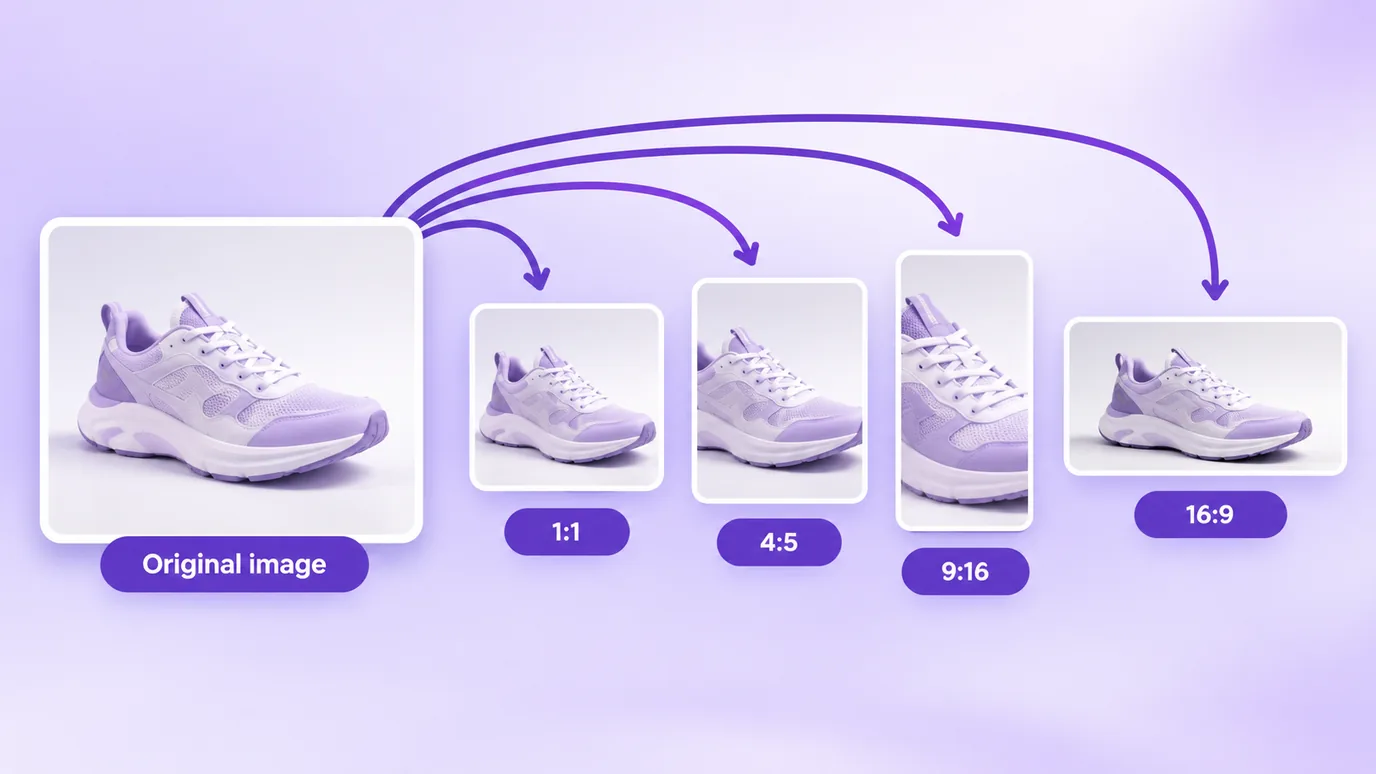
How to change the aspect ratio of an image
- Choose your images or drag the files into the box. Nothing is sent to a server.
- Pick the aspect ratio: 1:1, 4:5, 3:4, 4:3, 3:2, 16:9, 9:16 or 21:9.
- Pick the crop position (start, center or end) to decide which part of the image is kept.
- Check the thumbnail and the dimensions under "After" and download.
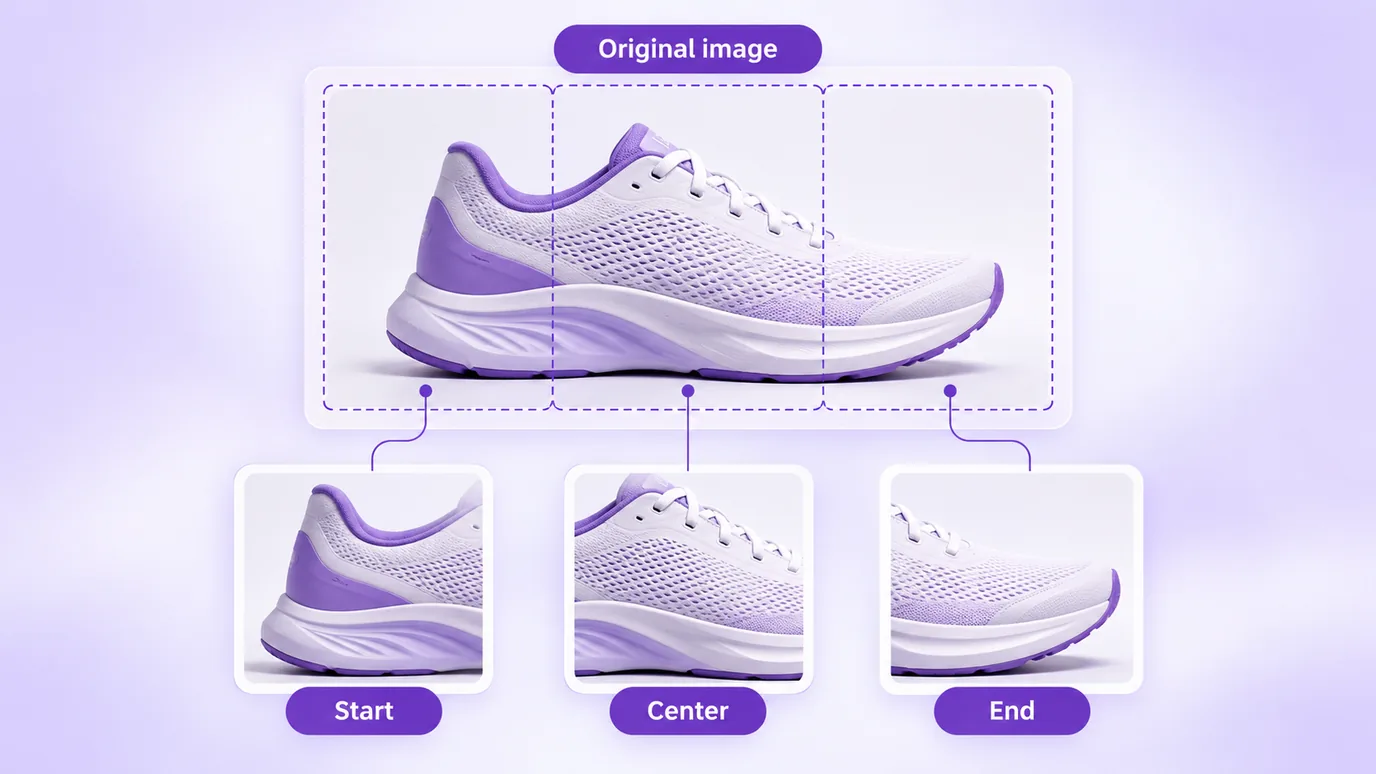
The most used aspect ratios
- 1:1 (square): product photos in many stores and square posts.
- 4:5 (portrait): the Instagram feed uses 1440 × 1800 px, which is 4:5, according to Meta.
- 9:16 (vertical): Stories and Reels use 1440 × 2560 px, which is 9:16, according to Meta.
- 16:9 (landscape): the default format of video and of many banners and covers.
- 4:3 and 3:2: common aspect ratios of cameras and printed photos.
- 21:9: a very wide format, used in banners and cover images.
What happens to the resolution
The crop uses the largest possible rectangle of your image in the chosen ratio, without enlarging or reducing: the pixels that stay keep their original quality. That is why a cropped image has fewer pixels than the original.
If you need an exact size in pixels after changing the aspect ratio, use the pixel resizer afterwards.
What this tool does not do
- It does not add bars or margins to fill the frame: it crops.
- It does not pick the best framing for you: you decide the crop position.
- It produces a new image, without the metadata of the original file (such as EXIF).
Questions about changing the aspect ratio of an image
How do I change an image to a 16:9 aspect ratio?
To change an image to a 16:9 aspect ratio, add the file, choose 16:9 and the crop position, and download. The image is cropped to the largest possible 16:9 rectangle, without losing resolution.
How do I make an image square (1:1)?
To make an image square, choose the 1:1 aspect ratio. The tool crops the largest possible square from the image, at the position you pick: start, center or end.
What aspect ratio does the Instagram feed use?
According to Meta, the Instagram feed uses 1440 × 1800 px, which is a 4:5 aspect ratio. Choose 4:5 to crop your image to that format.
What aspect ratio do Stories and Reels use?
According to Meta, Stories and Reels use 1440 × 2560 px, which is a 9:16 aspect ratio. Choose 9:16 to crop your image to that format.
Does changing the aspect ratio lower the image quality?
No. When you change the aspect ratio the image is only cropped, and the pixels that stay keep their original quality. What goes down is the number of pixels, because part of the image is removed.
Can I change the aspect ratio without cropping the image?
To change the aspect ratio without cropping you need to add empty areas (bars or margins), and this tool does not do that: it crops. If you cannot lose any part, choose the aspect ratio closest to the original.
How do I choose which part of the image stays in the crop?
Use the crop position: start (top or left), center or end (bottom or right). Check the thumbnail under "After" before downloading and change the position if something important gets cut.
What is the difference between changing the aspect ratio and resizing?
Changing the aspect ratio changes the shape of the frame by cropping; resizing changes the number of pixels in width and height. You can do both: change the aspect ratio and then resize to the size you need.
Can I change the aspect ratio of several images at once?
Yes. You can change the aspect ratio of up to 30 images at a time with the same setting and download them all in a ZIP file.
Is my image uploaded to a server when I change the aspect ratio?
No. When you change the aspect ratio, the processing happens in your browser and the file is not sent to any server.
Other ways to adjust the image
The same in-browser tool, to: